LISTINGVID JOURNAL
ListingVid vs Reel-E for real estate video
Both tools are built for real estate, but they begin from different inputs and emphasize different parts of the property-video workflow.
The quick answer
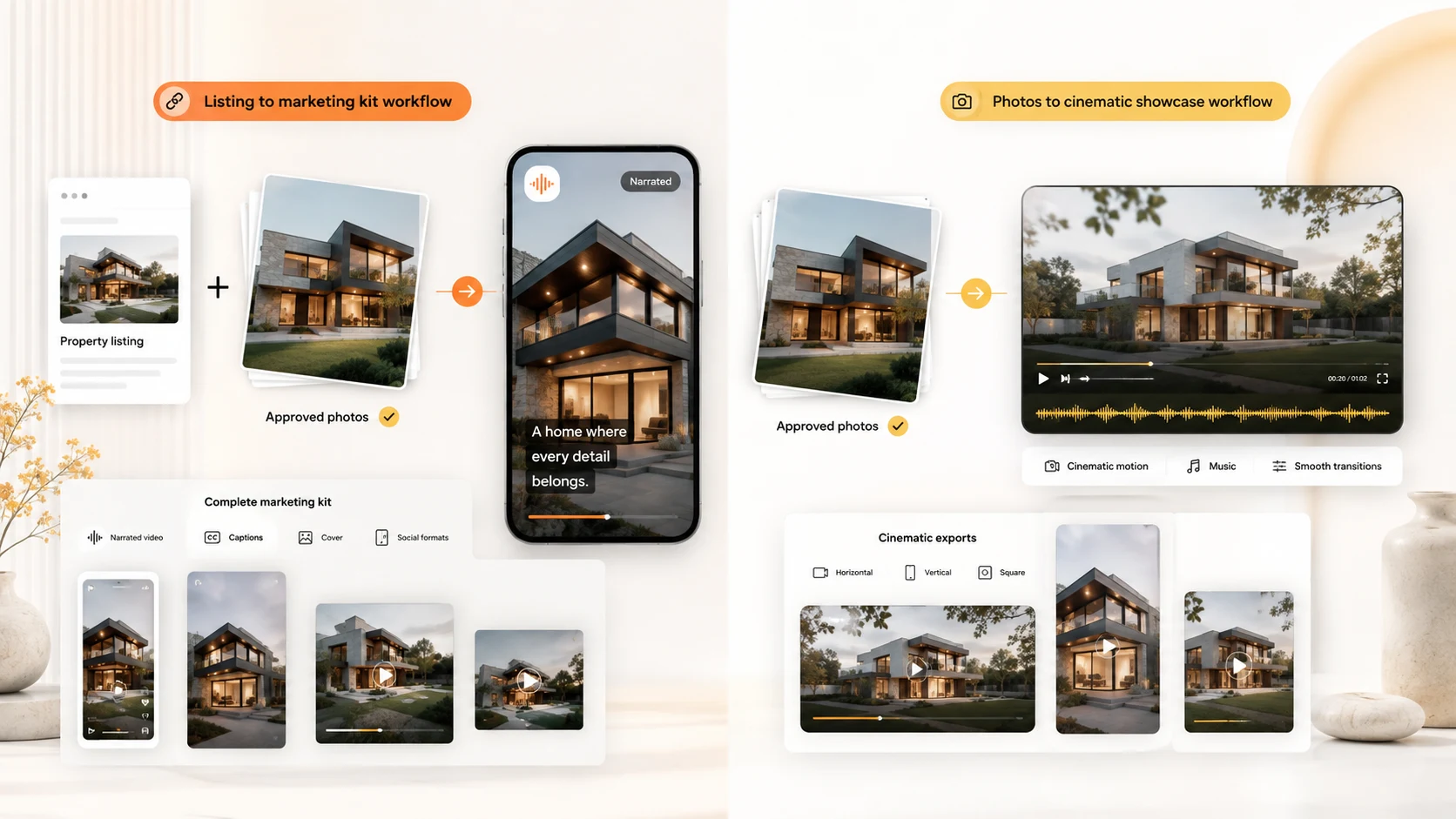
Choose ListingVid when the workflow should begin with a property listing URL or approved photos and continue into narrated video, captions, branding, multiple aspect ratios, and property-image work such as virtual staging or enhancement. Choose Reel-E when the main job is turning an uploaded photo set into a music-led cinematic property showcase with generated camera motion and branded and unbranded exports.
Neither starting point is universally better. The practical question is whether your recurring bottleneck is rebuilding listing information and campaign assets, or creating polished motion from an already prepared photo set.
Listing URL workflow versus photo-upload workflow
ListingVid is organized around the listing as a source of approved property facts and imagery. An agent can start from a supported listing URL or upload the photos, then review the property story, narration, captions, music, branding, and output format before publishing.
Reel-E’s current getting-started documentation describes a photo-first flow: select the property type and music, upload and arrange 3–40 authorized photos, optionally add a logo, choose camera movements such as push-in, pull-out, or orbit, and generate the finished showcase. Its Magic Sort option can arrange a photo set into a tour-like sequence.
What each product emphasizes
ListingVid connects video creation with a broader listing-content workflow: AI voiceover, captions, agency branding, vertical, square, and horizontal exports, plus property-photo tools for staging, vacancy, lighting, twilight, and enhancement. That combination is useful when one approved listing must become several marketing assets.
Reel-E emphasizes cinematic motion generated from still property photos, music-synchronized editing, optional branding, and six output versions: 16:9, 9:16, and 1:1 in branded and unbranded forms. Its published documentation is especially detailed about photo order, camera movement, music, and export variants.
How an agency should test both tools
Use the same approved listing and photo set. Measure the time to a reviewable first cut, then inspect room order, factual accuracy, motion quality, caption readability, narration control, brand consistency, and the effort required to prepare every channel you actually use.
Reel-E’s current trial documentation says trial videos carry a watermark and downloads remain locked until the subscription continues. Product details and plan limits can change, so verify current terms directly. For ListingVid, test both the URL and photo-upload paths to see which produces the more repeatable handoff for your team.
ListingVid and Reel-E workflow comparison
This table compares ListingVid’s current property workflow with Reel-E’s published product and documentation pages. It is a fit comparison, not a ranking.
| Decision point | ListingVid | Reel-E |
|---|---|---|
| Primary starting point | Supported property URL or approved photos | Uploaded authorized property photos |
| Core emphasis | Listing information to narrated, branded campaign assets | Photo set to cinematic, music-led property showcase |
| Story controls | Room sequence, property facts, voiceover, captions, music, and branding | Photo order, Magic Sort, music, camera movement, and optional logo |
| Video formats | Vertical, square, and horizontal outputs | 16:9, 9:16, and 1:1; branded and unbranded versions |
| Property-image workflow | Virtual staging, vacancy, lighting, twilight, and enhancement tools | Current pricing lists photo edits, staging, and AI cinematic activations by plan |
| Published trial detail | Confirm current onboarding and limits inside ListingVid | Seven-day trial; documentation states trial videos are watermarked and downloads remain locked until conversion |
| Best fit to test | Teams repurposing a listing into narrated video and related visual assets | Teams prioritizing cinematic camera motion and multiple branded/unbranded showcase exports from photos |
FAQ
Questions agents ask before choosing
Is ListingVid a Reel-E alternative?
Yes, for real estate teams comparing AI property-video workflows. ListingVid starts from a supported listing URL or photos and combines video, narration, captions, branding, social formats, and property-image tools. Reel-E’s published workflow starts from uploaded photos and emphasizes cinematic camera motion, music, branding, and six export versions.
Which tool is better for turning a listing URL into video?
ListingVid is the more direct fit when the URL itself should provide the starting point. Reel-E’s current documentation instructs users to download authorized listing photos and upload them into its photo-first workflow.
Which tool is better for cinematic motion from property photos?
Reel-E explicitly centers its product on generated camera movements such as orbits, push-ins, and pull-outs. ListingVid should be tested when the requirement extends beyond motion into listing facts, AI voiceover, captions, and additional property marketing assets.
Do both products create social-media formats?
Yes. ListingVid supports vertical, square, and horizontal property-video outputs. Reel-E publishes 16:9, 9:16, and 1:1 exports in branded and unbranded versions.
How should I choose between ListingVid and Reel-E?
Run the same real listing through both. Compare source preparation, first-cut quality, factual review, motion, narration, captions, branding, export variants, image tools, plan limits, and the total effort required before every channel is ready.
Product sources reviewed
Product capabilities change. These official sources were reviewed for this comparison:
Test the property-first workflow on your next listing.
Start with a listing URL or the photos your team already approved, then create a reviewable property video for the channels you use.